Key Capabilities
Why teams choose DataStream for Splunk
A purpose-built pipeline that unlocks the full value of Splunk without the license bill that usually comes with comprehensive log coverage.
Wide source coverage
On-premises, cloud, legacy systems, OT/ICS networks, IoT devices, and custom applications – all widely used sources are supported out of the box with no custom Heavy Forwarder or Universal Forwarder configuration required.
CIM normalization engine
Automated mapping and validation against Splunk’s Common Information Model. Every event is enriched with the correct sourcetype, index, and CIM-compliant fields so dashboards, correlation searches, and accelerations work on day one.
License cost optimization
Filter, deduplicate, sample, and route at the edge before data hits the indexer. Typical customers reduce their daily ingest volume by 40–60% while expanding security coverage.
Multi-stage routing architecture
Intelligent routing sends security-relevant data to the Splunk Indexer, full data to Splunk SmartStore (S3-backed), raw data as Parquet to S3 or Azure Blob Storage, and supports Splunk Federated Search – all from a single pipeline.
Schema drift detection
Automated validation prevents schema changes from breaking correlation searches, accelerated data models, or compliance reports. Proactive alerting on data quality issues before they reach Splunk ES.
Splunk ES & SOAR ready
CIM-compliant output ensures Splunk Enterprise Security correlation searches, risk-based alerting, and SOAR playbooks function optimally – with no manual field extraction or sourcetype mapping required.
ARCHITECTURE
How DataStream works
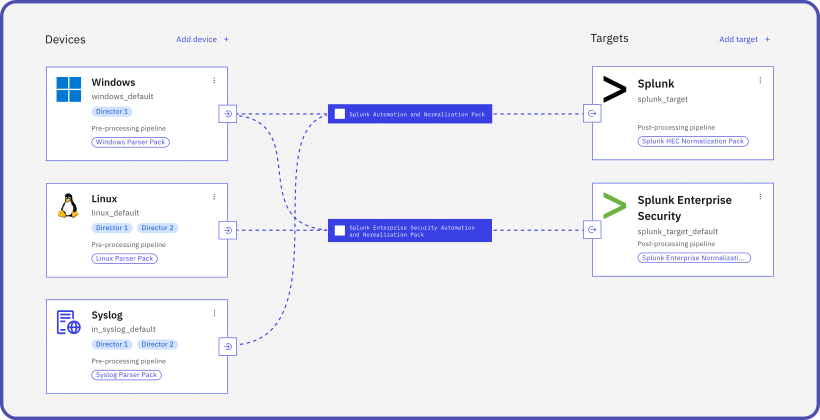
A multi-stage pipeline that processes raw logs before they reach Splunk: each step adds value and reduces license cost.
Ingest
Logs from any source via agents, agentless (WinRM/SSH), Syslog, CEF, LEEF, HEC, APIs, and direct connectors
Parse & normalize
CIM-aware parsers and sourcetype mapping: Windows Events, syslog, JSON, custom formats
Enrich & validate
Contextual metadata enrichment + schema validation against Splunk CIM data models
Filter & optimize
Deduplication, sampling, and field extraction reduce volume by 40–60%
Route & deliver
Multi-stage routing: security-relevant → Splunk Indexer, full data → SmartStore, raw → S3 (Parquet), analytics → Federated Search
API & authentication
- Splunk HTTP Event Collector (HEC)
- HEC token-based authentication with TLS
- Indexer Acknowledgement for guaranteed delivery
- High-throughput batching with retry logic
- Rate limiting & throttle prevention built-in
CIM components
- Pre-built sourcetypes for common security data sources
- Field extraction aligned to CIM data models
- Anomaly detection on schema drift
- Compatible with Splunk ES correlation searches
- Optimized for accelerated data models
Deployment options
- Docker / Kubernetes container deployment
- On-premises agent deployment
- Cloud-native (AWS, Azure, GCP)
- Air-gapped & data-residency configurations
- Multi-tenant MSSP configurations
Built for enterprise challenges
Splunk license cost reduction
Splunk’s volume-based licensing makes costs scale linearly with data growth. DataStream acts as an intelligent optimization layer that reduces ingest volume by 40–60% through CIM-aware filtering, deduplication, and field extraction, without creating security blind spots or breaking existing dashboards.
Legacy & OT integration
Legacy systems, OT networks, IoT devices, and custom applications often lack maintained Splunk Technology Add-ons. DataStream provides ready-made connectors for all widely used sources and flexible transformation pipelines that eliminate custom TA development and reduce time-to-value from months to days.
Splunk ES & SOAR activation
Splunk Enterprise Security and SOAR playbooks rely on CIM-compliant data to function optimally. DataStream’s automated CIM mapping ensures all ingested data is immediately available for correlation searches, risk-based alerting, and automated investigation workflows – no manual field extraction.
MSSP customer onboarding
MSSPs and security integrators can onboard new customers to Splunk dramatically faster. Pre-built connectors, automated CIM normalization, and license optimization out of the box – standard deployment in a few days instead of months of custom TA and props.conf development.
ROI & SAVINGS
Measurable impact on your Splunk budget
With DataStream, you can extend coverage to more sources without increasing your Splunk licensing costs.
Daily ingest volume before indexing
Intelligent filtering retains all security-relevant events while removing operational noise — directly reducing your Splunk license consumption.
Deployment timeline
Pre-built connectors and automated CIM normalization eliminate custom TA work and accelerate time-to-value.
Comparison
VirtualMetric vs. Alternatives
How does DataStream compare to other data pipeline solutions for Splunk?
|
Cribl Stream
|
Logstash
|
VirtualMetric DataStream
|
Splunk Forwarders
|
|
|---|---|---|---|---|
| Native Splunk integration (HEC) | Plugin required | |||
| Automated CIM normalization | Manual | Manual | Fully automated | Per TA |
| Splunk ES / SOAR ready | Generic | Fully optimized | TA dependent | |
| OT / Legacy / IoT connectors | Add-ons req. | Custom config | All widely used sources built-in | Limited |
| Multi-stage routing architecture | Basic routing | Pipeline only | Indexer + SmartStore + S3 + Federated | |
| Raw data → S3 / Blob (Parquet) | Manual setup | |||
| License cost reduction | Generic | 40–60% CIM-aware | ||
| MSSP multi-tenant support | ||||
| Schema drift detection | Real-time | |||
| Container / Cloud-native deployment | Docker, K8s, AWS, Azure, GCP |
Frequently asked questions
How can I reduce Splunk license costs without losing security visibility?
Splunk licenses on ingested data volume, so cost scales directly with how much you send. DataStream reduces that volume through a layered approach. By default, field-level optimization removes empty values, null fields, and operational metadata that Splunk analytics rules never reference, achieving 55–60% reduction with no security risk. Optional event-level filtering and statistical sampling can push total reduction to 70–80%, with security-critical events always protected. Full raw logs are simultaneously routed to low-cost storage (AWS S3, Azure Blob, SmartStore) with a Correlation ID, so analysts can retrieve complete records for forensic investigations when needed.
Read more: How to Reduce SIEM Costs Without Losing Security Visibility
Why do I need a pipeline tool if Splunk already has Universal Forwarders and props/transforms.conf?
Universal Forwarders and props/transforms.conf handle basic filtering and field extraction within the Splunk stack, but they have significant limitations. They can’t collect from agentless sources or systems without a forwarder installed, they don’t normalize logs to CIM across diverse source types automatically, and they send everything to a single Splunk destination.
DataStream operates before data reaches Splunk: it collects from any source via agentless collection (WinRM/SSH) or agents where needed, applies vendor-specific CIM normalization with no manual TA development, reduces volume before it hits your license meter, and routes different data types to the right destination: Splunk Indexer, SmartStore, AWS S3, or Azure Blob based on security value.
How does CIM normalization work, and do I need to write TAs and field extractions manually?
Splunk’s CIM normalizes logs from different sources to a common schema so that a single correlation search can query e.g. Windows events, Palo Alto firewall logs, and CrowdStrike telemetry using the same field names. Traditionally, this requires writing or maintaining Technology Add-ons (TAs) – a process that can take days per source type and breaks every time a vendor changes their log format. DataStream handles CIM mapping automatically using vendor-specific optimization packs developed through analysis of real-world security operations. Each pack maps source fields to CIM data models at ingest time, with no manual regex authoring or TA maintenance required. The normalization is deterministic and fully auditable: every field mapping decision is documented and traceable, not AI-generated.
How do I connect sources that don’t have maintained Splunk Technology Add-ons?
DataStream supports both agentless and agent-based collection. Agentless collection connects directly via WinRM (Windows) or SSH (Linux, macOS, Solaris, AIX) with no software installation. For network devices, OT/ICS systems, and security appliances, DataStream supports standard collection protocols including Syslog, as well as common log formats such as CEF and LEEF, and REST APIs for cloud-based sources. Pre-built content packs cover all widely used vendors such as Fortinet, Palo Alto, Check Point, CrowdStrike, CyberArk, Zscaler, and more; each activating automatically when logs from that vendor are detected, with no manual TA configuration needed.
How does DataStream handle sensitive data before it reaches Splunk?
DataStream applies policy-based redaction and masking in the pipeline before data leaves your environment. You define rules through a no-code UI to automatically remove or obfuscate sensitive fields: usernames, passwords, tokens, PII such as email addresses and phone numbers, or any custom field. Redaction is applied consistently across all incoming data. The structure and security context of each log remain intact, so Splunk correlation searches and ES detection rules continue to work accurately. Policies are designed to support GDPR, HIPAA, and PCI DSS requirements, and redacted pipelines are audit-ready.
Can DataStream send data to both Splunk and cloud storage simultaneously?
Yes, multi-destination routing is a core capability. DataStream can simultaneously send CIM-normalized, security-relevant events to Splunk Indexer or Splunk Cloud for real-time analytics; full data volume to Splunk SmartStore; and raw logs in Parquet format to AWS S3 or Azure Blob Storage for long-term retention at a fraction of Splunk licensing cost. Each destination receives the appropriate data tier based on security value, with a Correlation ID linking optimized Splunk data back to complete raw logs in archive storage for forensic investigations.
How long does it take to deploy DataStream?
Initial deployment takes under 30 minutes. DataStream’s guided setup automatically handles authentication, HEC configuration, and pipeline routing — no manual Splunk infrastructure changes required. A live demo by our solution engineer shows a complete integration in 13 minutes, without cuts. Watch it on YouTube.
Talk to our experts
Schedule a technical session with our engineering team to see how DataStream compares to what you’re running today.
Try DataStream
Route data to your SIEM in the correct schema, with automatic normalization and up to 90% data volume reduction.
Try now