The challenge
Send every log where it belongs
Security data often needs to go to multiple destinations: SIEM, analytics platforms, and storage. Without a unified system, teams rely on scattered scripts and manual integrations, leading to errors, duplicated data, and rising costs. Routing decisions are often inflexible, making it hard to adapt pipelines as requirements change.
The Solution
DataStream – intelligent security data pipeline platform
Context-driven routing
Routing decisions are driven by security context – source type, dataset, severity, and normalized fields. This ensures that logs are consistently directed to the right destinations: critical alerts – into SIEM, audit trails – into storage, and aggregated data – into analytics platform.
Multi-destination delivery
DataStream can send the same log to detection, analytics, and compliance systems in parallel, without duplication or extra effort.
Adaptive policies
Routing rules can be updated instantly without downtime. Policies adapt to changes in infrastructure, detection needs, or compliance requirements, keeping pipelines flexible and future-ready.
Routes for every level of complexity
Connect a source to a destination on a visual canvas in a few clicks. For complex flows, advanced routes classify events and send each one to the right destination, table and schema.
Key benefits
Why this approach works

Supported environments
One platform, no puzzle to assemble
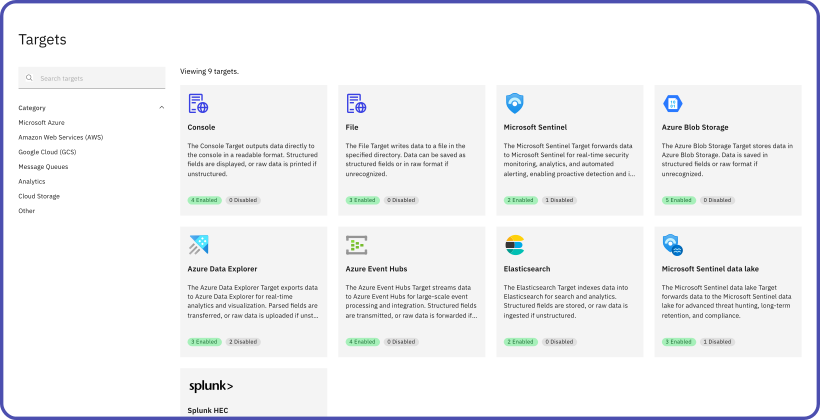
DataStream’s ready-to-use vendor packs eliminate manual setup, so you don’t need custom scripts or multiple tools just to route data to the right destination.
Frequently asked questions
Which destinations does DataStream route to?
DataStream routes to SIEMs, data lakes, analytics platforms and storage. Common destinations include: SIEMs such as Microsoft Sentinel, Splunk, Google SecOps, Elastic Security, IBM QRadar, CrowdStrike Falcon Next-Gen SIEM and more. Data lakes such as Sentinel data lake, Amazon Security Lake, Azure Data Explorer, Google BigQuery, Snowflake, etc. Storage such as Amazon S3, Azure Blob Storage, Google Cloud Storage and more. Analytics platforms such as Databricks, ClickHouse, Elasticsearch, etc. The same event can go to several destinations at once. The full list is on the integrations page.
Which schemas and formats does DataStream support?
DataStream normalizes natively to ASIM, CommonSecurityLog, OCSF, ECS, CIM and UDM. It handles common log formats, including CEF, LEEF, Syslog, JSON, GELF, OTLP and Parquet. Each destination receives data in the schema it expects.
Does DataStream support OpenTelemetry?
Yes. DataStream receives and sends logs, metrics and traces over OTLP. Data follows OpenTelemetry semantic conventions, so OTel-based tools read it without extra mapping.
Does routing introduce latency?
Routing happens inside the streaming engine with sub-millisecond overhead.
How does routing help with compliance?
Compliance-relevant data can be automatically routed to secure, long-term storage with audit-ready guarantees and timestamp integrity.
Can routing rules be changed on the fly?
Yes. Policies can be adjusted dynamically without downtime or disruption to pipelines.
Do we need scripts or third-party tools to manage routing?
No. Routing policies are defined in DataStream’s low-code/no-code interface, so you can configure them without maintaining custom scripts.
Get DataStream in Microsoft Security Store

Deploy DataStream in minutes with Azure Managed Identity support built in. No credential management, no manual setup.